
For roofing & exterior contractors
Every job, from first call to final payment.
Leads, roof measuring, pricing, proposals customers sign online, invoices and card payments, job profit and commissions, crews and subs with a GPS time clock: one system your office and your crews both use.
30-day free trial. Works in any web browser, on any device.
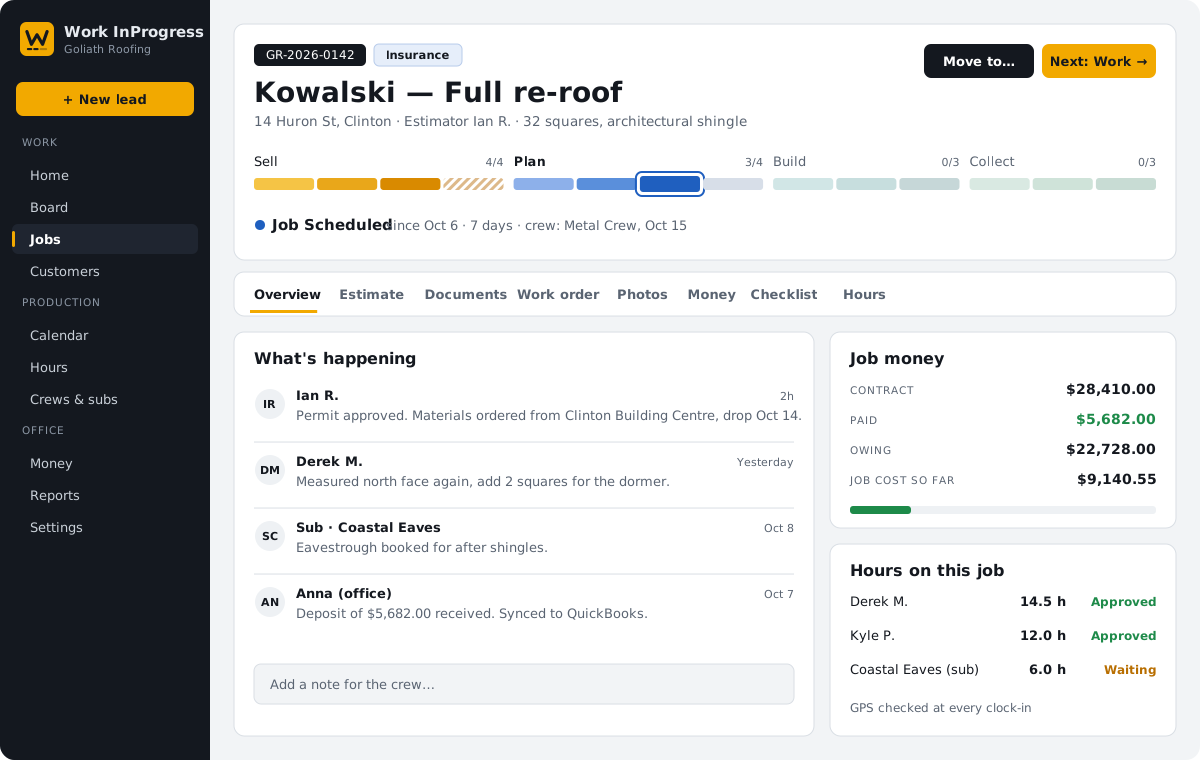
Lead → Appointment → Estimate → Follow up → Contract → Scheduled → Work → Inspection → Invoice → Paid
Set up for
Roofing
Steel & standing seam
Flat roofs
Siding
Soffit, fascia & trim
Eavestrough & gutters
Windows & doors
Skylights
Decking
Repairs & service
One system, the whole job
Stop running the business from five apps and a whiteboard.
Sales pipeline
Leads come in from your website, phone or the field. Book the appointment, track every follow-up, and find any customer, job or invoice from one search box.
Measure roofs yourself
Built-in roof measuring from satellite pictures, a screenshot or a drone photo. Trace the planes, get the pitch, and send squares, eaves and ridges straight to the worksheet. No Hover or Roofr bill.
Pricing that adds itself up
Materials from your price list, sub pay by pitch, storeys and complexity, and the price at your target margin with financing. One click puts it in the quote.
Proposals in your own layout
Good, Better, Best options with your logo, letter, product sheets and warranty certificate. Customers add upgrades, pick colours and sign from their phone.
Production and scheduling
Put a crew or a sub on each job with start and finish dates and notes for the site. Job flags show the warranty and materials sold at a glance.
Crews and subs in the field
A time clock with GPS, job photos and crew notes on any phone. Subs see only their jobs, never your prices.
Know what every job made
Gross profit from the quote, net profit from what the job really cost. Jobs that slip more than 10% are flagged with the reasons until two managers sign off.
Commissions and sales goals
Commission on gross profit, a higher rate for self-generated jobs, yearly goals broken into months and shortfalls carried forward. Worked out for you when the job is done.
Reports you build yourself
Sales by rep, what's owing, hours by job and a dozen more ready to go, or build your own with filters, totals and charts. Save them, pin them, copy them into Excel.
The workflow
Know where every job stands.
Every job moves through four phases: Sell, Plan, Build and Collect. Each job carries a progress rail, so the office, the crews and the owner see how far along it is at a glance. Every stage records when the job arrived and how long it sat there.
Skip a stage and it is marked skipped, not lost. Rename, recolour or reorder the stages to fit how your company works.
Sell
- LeadPhone, web form or walk-in
- AppointmentBooked with the customer
- Estimate & proposalMeasured and priced
- Follow upKept on the board until they decide
Plan
- ContractContract date recorded
- To be scheduledWaiting on approval or permit
- Job scheduledCrew or sub booked
- Repair pendingSmall jobs take a short path
Build
- RepairsIn and out the same week
- WorkCrew clocked in on site
- Work completedPhotos and sign-off
Collect
- Inspection & invoiceFinal check before invoicing
- Invoice sentWaiting on payment
- PaidOff the board after 30 days
Logins and permissions
Everyone gets a login. Nobody sees more than they should.
Your subs never see your prices. Your customers never see your costs. Your crew lead never sees the owner's margin. Each company's data is kept in its own separate database.
Owner
Everything, including net profit on every job, commission approvals and billing.
Admin / Manager
Runs the business: customers, jobs, pricing, invoices, net profit, profit alerts, commissions and sales goals, team and settings.
Other staff
Sales, production and office: the same menu as managers, with gross profit. No net profit, no commission approvals.
Sales rep
A tick on any office login: on the sales leaderboard, with their own commission and monthly goal on the dashboard.
Crew member
The phone app: time clock, today's jobs, directions, crew notes and photos. No prices.
Subcontractor
Only the jobs assigned to them. No prices, no other customers.
Customer
No login needed to sign proposals, approve change orders and pay invoices; an optional login shows their own project.
In the field
Hours you can trust, from the roof, not from memory.
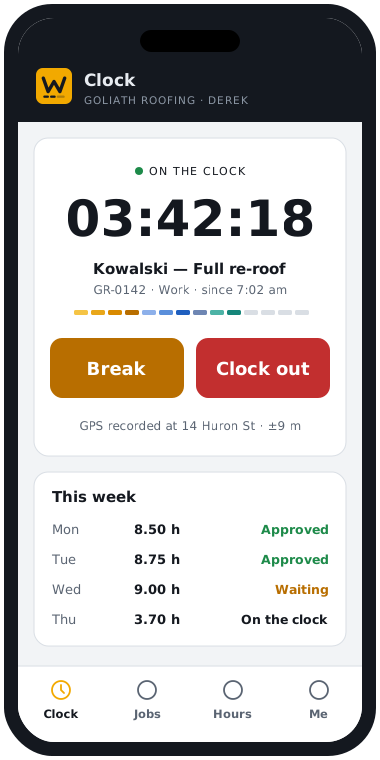
- Clock in, Break and Clock out from the phone app, with the GPS location recorded at each tap.
- The office checks each person's week, fixes a missed punch and approves the hours in one click.
- Crews see the address, the scope, the material list and the crew notes. Never the price.
- Subs log in to see only their jobs, with directions, the scope, photos and notes.
- Hours add up on every job, so you can see where your labour went.
QuickBooks Online Coming soon
Enter it once. Your books keep up.
Connect your own QuickBooks Online company in a few clicks. Every job shows whether it is in sync, and anything that did not go through is listed so the office can fix it.
| In Work InProgress | In QuickBooks | Direction |
|---|---|---|
| Customers | Customers | Both ways |
| Jobs | Projects (sub-customers) | To QuickBooks |
| Accepted proposals | Estimates | To QuickBooks |
| Invoices and change orders | Invoices | To QuickBooks |
| Payments | Payments | Both ways |
| Materials and labour prices | Products and services | Both ways |
| Approved crew hours | Timesheets | To QuickBooks |
| Job bills from suppliers and subs | Bills | To QuickBooks |
Pricing
Pay for the people who use it. Nothing else.
Every feature for every company. Start with a free 30-day trial, then pay monthly for your staff, crews and subs. Customers are always free.
Office staff
Everyone who works in the office version.
$25 each / month
- Customers, jobs, dashboard and job board
- Proposals with e-signing, change orders
- Invoices, payments and card payments
- Roof measuring and the pricing calculator
- Job profit, profit alerts and commissions
- Tasks, calendar, crews and time sheets
- QuickBooks Coming soon
Crew & subs
Your field employees and subcontractors, on their phones.
$2 each / month
- Time clock with GPS for crews
- Subs see only the jobs you give them
- Job photos and notes from the field
- Never see your prices
Customers
The homeowners you work for.
Free as many as you need
- Sign proposals and change orders online
- Pay invoices online by card
- Their own login: job progress, start date and updates
- Never see your costs
Example: 4 office staff × $25 + 10 crew members and 2 subs × $2 = $124 a month.
Prices in CAD, before tax. Only people who can sign in count: stop someone's access and you stop paying for them. Cancel any time and take a full export of your data with you.
Questions
What contractors ask us first
Do my crews need to install an app?
No. Work InProgress runs in the web browser on any phone, tablet or computer. Crews can add it to their home screen so it opens like an app.
Can I bring my customers and jobs from my current system?
Yes. Send us an export from your current CRM or a spreadsheet and we will bring your customers, jobs and their stages across, keeping your job numbers.
How does pricing work?
You pay $25 a month for each office staff login and $2 a month for each crew member or subcontractor. Customers are free. Every company starts with a free 30-day trial.
Is my company's information kept separate from other contractors?
Yes. Every company has its own separate database. Your customers, prices and jobs are never stored alongside another company's.
Can I change the workflow stages?
Yes. Rename, recolour, add or remove stages, and set up your own trades, work types, flags and lead sources.
How does the QuickBooks Online connection work?
It is coming soon. You will connect your own QuickBooks Online company from the settings page, and customers, invoices, payments, products, approved hours and bills will then sync without retyping.
Do I still need Hover or Roofr?
No. Roof measuring is built in: trace the roof on a satellite picture, a screenshot or a drone photo, get the pitch from Google's 3D model or a phone photo, and send the numbers straight to the worksheet and the quote.
Can it work out sales commissions?
Yes. Commission is worked out from each job's gross profit when the job is completed, with a higher rate for self-generated jobs, monthly goals from each rep's yearly goal and shortfalls carried forward. A manager approves each one.
Can my proposals look like the ones we send now?
Yes. Add your logo, colours, letter, product sheets, warranty certificate and terms. Customers can add recommended upgrades and pick colours as they sign.
Where do I get help?
Inside the app under Help & support: a step-by-step user manual, the knowledge base, and a button to report a problem with screenshots. The knowledge base is also on this website.
What do subcontractors see?
Only the jobs you assign to them: the address, scope, schedule, crew notes and photos. They never see your prices, other customers or your costs.
What happens if I cancel?
You keep access until the end of the month you were invoiced for, and we send you a copy of your customers, jobs, invoices and documents if you ask. There's no contract and no cancellation fee.
Put your next job in progress.
Bring your jobs over, add your crew and have them clocking in this week.