
Features
Built around how a contracting job actually runs.
From the first phone call to the final payment, every step lives on one job page that the office, the crew, the sub and the customer each see their own way.
The workflow
Know where every job stands.
Every job moves through four phases: Sell, Plan, Build and Collect. Each job carries a progress rail, so the office, the crews and the owner see how far along it is at a glance. Every stage records when the job arrived and how long it sat there.
Skip a stage and it is marked skipped, not lost. Rename, recolour or reorder the stages to fit how your company works.
Sell
- LeadPhone, web form or walk-in
- AppointmentBooked with the customer
- Estimate & proposalMeasured and priced
- Follow upKept on the board until they decide
Plan
- ContractContract date recorded
- To be scheduledWaiting on approval or permit
- Job scheduledCrew or sub booked
- Repair pendingSmall jobs take a short path
Build
- RepairsIn and out the same week
- WorkCrew clocked in on site
- Work completedPhotos and sign-off
Collect
- Inspection & invoiceFinal check before invoicing
- Invoice sentWaiting on payment
- PaidOff the board after 30 days
01 · Sales
Every lead gets followed up.
- Add a customer and their job from the office or the field in under a minute: the work, the site, the sales rep and how they found you.
- An instant estimator on your own website: homeowners see their roof measured and your price, and land on your job board as a lead.
- Book appointments on each rep's calendar and see the day's plan on the dashboard.
- Follow-up alerts: a lead with no note for 5 days becomes a task for its sales rep; Claude can draft the follow-up email.
- Each customer gets a referral link; every friend they send becomes a lead with the source Referral.
- Search suggests as you type: a name, a house number or an invoice amount.
- Roof inspection reports from your phone: photos with arrows and circles, how urgent each problem is, and the fix. The homeowner gets a report they can print, and one click turns it into a quote.
02 · Roof measuring
Your own Hover and Roofr, built in.
- Pull up the house from satellite pictures, or upload a screenshot or drone photo and set the scale.
- Trace each roof plane; corners snap together and edges are marked as eaves, rakes, ridges, hips, valleys and walls.
- Get the pitch from Google's 3D roof model, or from a photo of the gable end taken on your phone.
- Squares with waste, eaves, rakes, ridges, valleys and step flashing go straight onto the job's worksheet, or into a quick quote in seconds.
03 · Pricing and proposals
Measure once. Price three ways. Sign online.
- Price each product by the unit, square foot or linear foot: what the sub is paid and what the customer pays.
- Your price list and material lists work out the materials and waste. Import a price list from a spreadsheet, with colours.
- See the price at each target margin and with financing, and put it into a Good, Better or Best option with one click.
- Proposals in your own layout: cover, letter, options, upgrades, product sheets from your document library, a warranty certificate and your terms.
- Customers choose an option, tick upgrades, pick their colours and sign from any device.
- Add-on: supplier bills read for you, so material costs stay up to date without typing.
04 · Production
The office and the yard on the same page.
- Production calendar by month, week or Gantt, coloured by crew or sub, with the jobs waiting to be scheduled beside it.
- Crews graded A, B or C: sales picks the grade, A and B crews can swap, C stays C.
- Offer a job to several subs: they bid a price and start date, or the first to tap takes it.
- Move a job and the crew's later jobs move with it; each customer is emailed the new date and why.
- Jobs are scheduled oldest deposit first; skipping the line needs a reason. Subs report by crew with their own calendar.
- Calendars sync to iPhone, Android and Outlook.
- Order materials from the job: the worksheet’s quantities and the customer’s colours go to your supplier, who confirms the delivery date online. Their bill is checked against the order.
05 · Weather and storms
Rain on the forecast? You know first.
- Environment Canada's forecast for every booked job, checked every few hours. Rain, snow, storms and strong wind are flagged.
- One click moves the job and tells the customer it's the weather.
- Hail, wind, tornado and ice storm warnings list the past customers inside the warning area, for a free inspection offer or a call list.
- Offers follow Canada's anti-spam law, with a stop link in every email.
06 · Money and profit
Know what every job made.
- Deposit, change order and final invoices, with discounts and refunds worked out for you. Customers pay by card through your own Stripe or Square.
- Sales tax for the province the work is in, with GST and PST on separate lines.
- Payment reminders on the days you choose, in your own words, with a final notice and a task to phone.
- Gross profit from the quote; net profit from materials bought, crew hours and sub invoices. Jobs that slip more than 10% are flagged until two managers confirm them.
- A financial summary: sales, expenses and gross profit before tax, month by month, with roof squares and sub pay.
- Invoices, payments and bills go to your own QuickBooks Online. It only adds, matches what’s already there, and starts in review mode.
07 · Commissions
Sales reps paid right, without the spreadsheet.
- Commission on gross profit before tax, with a higher rate when the rep found the job themselves.
- Yearly sales goals for each rep, broken into monthly and quarterly goals.
- Paid only on sales above the goal; a short month carries forward, even into the next year.
- Worked out when the job is completed and approved by a manager.
08 · Customers
Customers always know where their job is.
- A private tracker link for every job, no password needed: contract, deposit, materials ordered, start date, work, paid.
- "On our way": the customer sees the crew lead's name and photo when they head out.
- Pay buttons, approved photos, the signed contract and warranties on the same page.
- When the job is done: a Google review request, a private feedback box, and a referral link for friends.
- Warranties on every job, and check-up reminders at 1, 5 and 10 years.
09 · Email
Every email, on the job it belongs to.
- An inbox for every job: emails and replies filed on the job, with attachments and read receipts.
- Email templates with your own wording and documents; send from any job in two clicks.
- Emails come from your company with your logo and the sender's signature.
- Claude can write the first draft for you to check and send.
10 · Crews and quality
Know which crews to send.
- A score out of 100 for every crew and sub: on-time work, quality ratings, callbacks, photos and billing what was agreed.
- The score suggests the A, B or C grade; one click sets it.
- Rate the work and log callbacks on each completed job.
- Photos are approved before customers and subs see them, in a photo library on every job.
11 · Reports
Any question, answered from your own data.
- Report templates: job financials, sales tax, commissions, workflow stages, work orders and more.
- Build your own from any field: several totals per group, your own headings, favourites and a glossary.
- Email any report on a schedule, copy it into Excel or download it.
- A monthly report of what Work InProgress did for you: leads it brought in, money collected and hours saved.
12 · Claude
Ask your business a question.
- Type a question like "Which rep sold the most this quarter?" and Claude builds the report, from your own numbers.
- Claude drafts emails and quote follow-ups for you to check and send.
- Runs on your own Claude account, so you pay Anthropic directly for what you use.
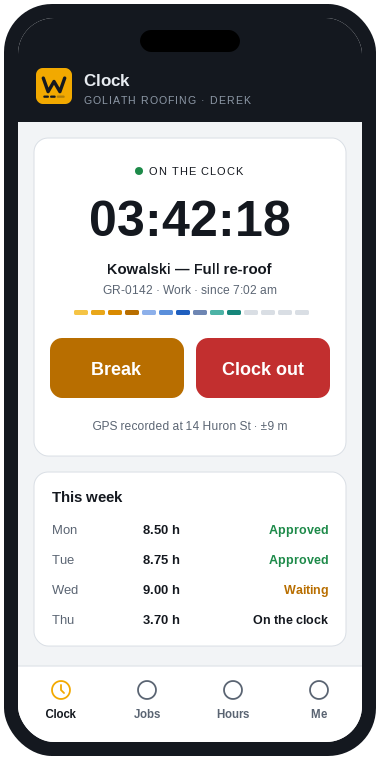
In the field
Hours you can trust, from the roof, not from memory.
- Clock in, Break and Clock out from the phone app, with the GPS location recorded at each tap.
- The office checks each person's week, fixes a missed punch and approves the hours in one click.
- Crews see the address, the scope, the material list and the crew notes. Never the price.
- Subs log in to see only their jobs, with directions, the scope, photos and notes.
- Hours add up on every job, so you can see where your labour went.
Logins and permissions
Everyone gets a login. Nobody sees more than they should.
Your subs never see your prices. Your customers never see your costs. Your crew lead never sees the owner's margin. Each company's data is kept in its own separate database.
Owner
Everything, including net profit on every job, commission approvals and billing.
Admin / Manager
Runs the business: customers, jobs, pricing, invoices, net profit, profit alerts, commissions and sales goals, team and settings.
Other staff
Sales, production and office: the same menu as managers, with gross profit. No net profit, no commission approvals.
Sales rep
A tick on any office login: on the sales leaderboard, with their own commission and monthly goal on the dashboard.
Crew member
The phone app: time clock, today's jobs, directions, crew notes and photos. No prices.
Subcontractor
Only the jobs assigned to them. No prices, no other customers.
Customer
No login needed to sign proposals, approve change orders and pay invoices; an optional login shows their own project.
QuickBooks Online
Enter it once. Your books keep up.
Connect your own QuickBooks Online company in a few clicks, even one you’ve used for years. Invoices, payments and bills go across, so nobody types them twice.
- It only adds: nothing in QuickBooks is ever deleted
- Customers, invoices and payments already there are matched, not added twice
- Nothing dated before your start date goes over
- Starts in review mode: you approve what goes, then switch to automatic
- Anything that didn’t go through is listed with the reason
| In Work InProgress | In QuickBooks | How |
|---|---|---|
| Customers | Customers | Matched by email or phone, or added |
| Invoices and change orders | Invoices | Same numbers, with your tax codes |
| Final invoices | Invoices | Less what was billed earlier |
| Payments | Payments | Applied to their invoice |
| Voided invoices | Voided | Only ones the sync sent |
| Supplier bills and sub invoices | Bills | If you want them |
Put your next job in progress.
Bring your jobs over, add your crew and have them clocking in this week.